AniPixel AI is an AI image to pixel art generator on the web with an anime-style focus. Upload an image, pick a look on Pixelize, generate, and download a PNG with clean pixel edges and compact colors. This page uses "Pixelize" to mean the studio on the nav bar, the screen where you upload, pick a preset, generate, and download. People looking to convert a photo to pixel art can start on Pixelize — photos work, but they are not the main use case. Results work as avatars, posts, wallpapers, or stickers, to keep or share.
What you can do here
- Pixelize — the main studio. AI redraws your image as pixel art.
- Remove Background — free, in-browser cutout to a transparent PNG. No credits.
- Pixel Art Scaler — free, in-browser recovery of the real pixel grid from AI-looking output, or integer upscale without blur. No credits.
- Pixelate — free, in-browser classic photo-to-pixel blocks.
- History — past Pixelize jobs when you’re signed in.
- Pricing — monthly plans and one-time credit packs.
Which “image to pixel art” tool do you need?
People searching for “image to pixel art”, “convert image to pixel art”, or “pixelate image online” often want one of three jobs:
| Path | What actually happens | Good for |
|---|---|---|
| AI redraw (Pixelize) | A model reinterprets the image as pixel art. Two runs can differ. | Avatars, posts, wallpapers, character-style looks |
| Classic mosaic / pixelate filter | The photo is divided into a grid; composition stays photographic. | Blocky photo effect, privacy chunk |
| Hand-drawn / editor pipeline | You place pixels on a fixed grid and palette. | Game sprites, tiles, animation frames |
Quick pick: blocky photo → Pixelate. Pixel-art style redraw → Pixelize. Shipping-accurate sprites → a dedicated pixel editor.
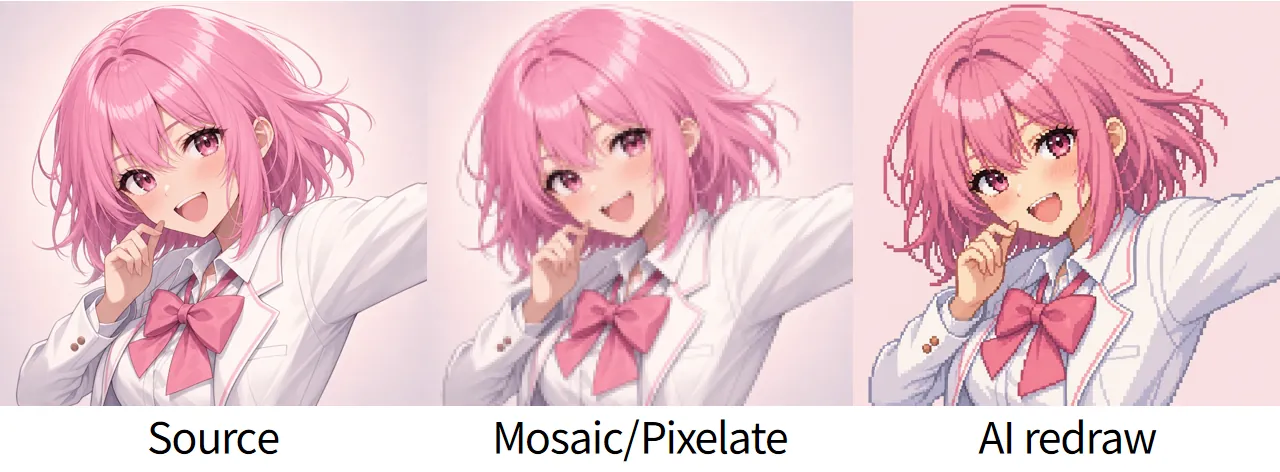
The middle panel stays photographic — only coarser cells. The right panel is a redraw: edges and color blocks were generated, not averaged from the source grid.
Quick path: upload to download
- Open Pixelize and upload a JPG, PNG, or WEBP (up to 20MB).
- Start with the Redraw preset and default settings.
- Generate one image, download the PNG, then change one thing at a time.
The full first-run walkthrough with screenshots is Getting started with Pixelize.
Scope notes
- Images in, pixel art out. AniPixel processes still images you upload — illustrations, screenshots, and clear photos.
- Fun-first, not a production pipeline. Locked grids, production palettes, and batch sprite sheets belong in dedicated studio tools. Review outputs before any serious use.
- Credits: Pixelize spends credits; the Generate button shows the charge for that run (Quality can raise it). The browser tools are free.
When another tool fits better
- Pixelize redraws the image as pixel art; small faces, logos, words, and accessories may change.
- Pixelate makes a blocky copy of the same photo while keeping the photographic layout.
- A pixel editor finishes locked production sprite sheets with manual review.
Who it’s for
- Turning anime-style art, character illustrations, or screenshots into pixel art.
- Character avatars, posts, stickers, and wallpaper experiments.
- Cleaning up or enlarging pixel-style results with the free tools after generation.
- Trying a clear photo when needed — supported, but not the primary scene.
If those uses match what you need, open Pixelize. If you already have pixel art and only need cutout or sharp scale, open Tools.
Can I turn an anime image into pixel art?
Yes. For an anime-to-pixel-art conversion, anime art, character illustrations, and screenshots are strong Pixelize sources when the character or main subject is clear enough to recognize. Start with Redraw when you want the composition to stay relatively close, Portrait for a face-focused square, and Chibi when exaggeration is intentional. Pixelize redraws the image rather than tracing every line, so text, logos, hair details, and small accessories may change; use better source images and the full Pixelize workflow for a controlled first try.
What to expect from a generation
- Results can reinterpret small details; they are not a pixel-perfect copy of the upload.
- Preset choice matters more than tiny slider tweaks — see Pixelize presets.
- A clear subject and a sensible crop beat raising Quality alone — see better source images.
- Failed generations refund their credit automatically.
Common mix-ups
- AI pixel art and pixelate filters do different jobs. Pixelize reinterprets silhouettes; Pixelate keeps the photo layout.
- A square preset controls the frame and style. Keeping the same character still depends on source size and crop.
- Free browser tools do not need Pixelize credits. Remove Background, Pixel Art Scaler, and Pixelate are separate local tools.
Related questions
Common follow-ups — ownership, privacy, transparent backgrounds, VIP — are answered in the AniPixel FAQ.